Versioning process
Mealz will not push breaking changes onto your website without your consent. This page explains how we introduce new behaviour so you keep control of what shoppers see, while we keep shipping improvements.
When you ask us for a change, or when we prepare a new capability, we pick one of the paths below. That choice is intentional: it is how we stay transparent about impact before anything reaches your production site.
Overview
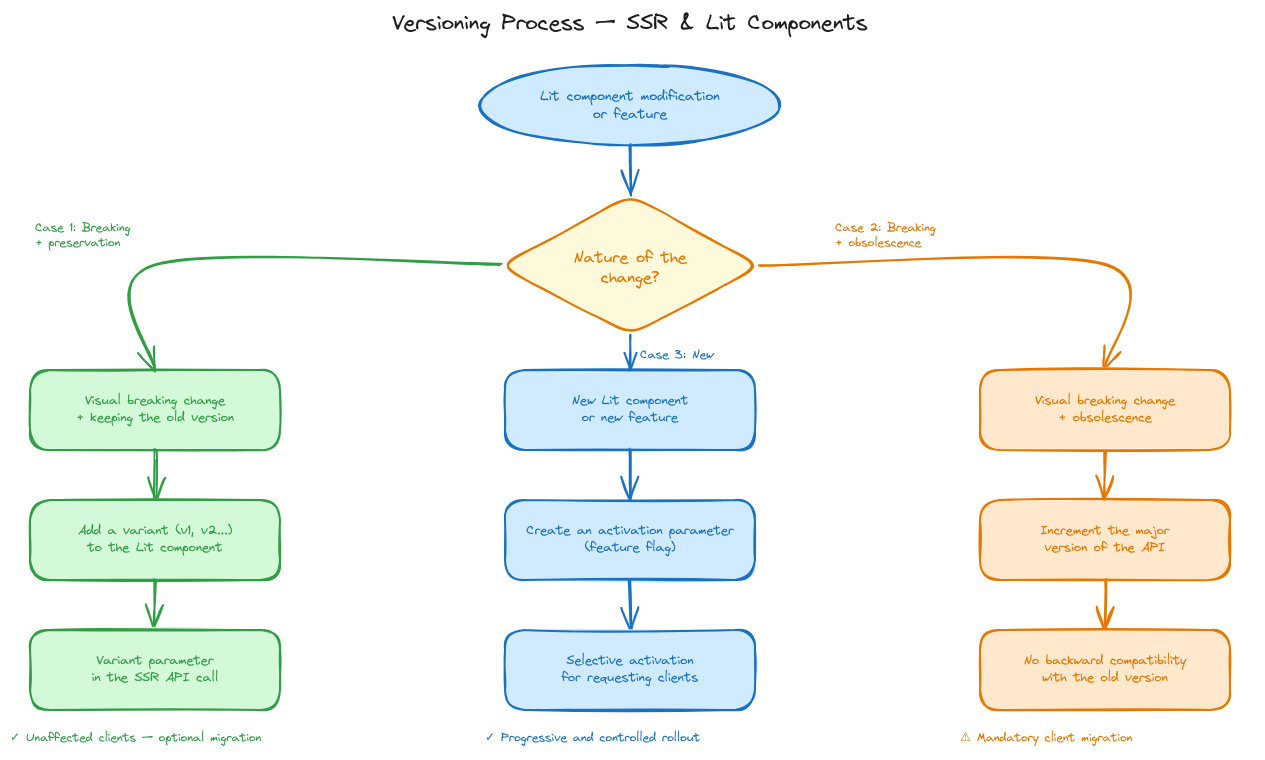
Every change to the Mealz SSR API or Lit components falls into one of three cases, depending on whether the visual result is breaking and whether the previous behaviour stays available.
Case 1: Breaking change with preservation
When it applies: the component’s visual output changes in a breaking way, but we want existing integrations to keep working until you choose the new look.
What we do:
- Add a new variant on the Lit component.
- Expose a
variant(or equivalent) parameter on the SSR route of the component, defaulting to the variant corresponding to the current behaviour. - You opt in to the new look by setting the new variant value when you are ready.
Impact on your integration: none until you change the parameter. You can migrate at your own pace.
Case 2: Breaking change with a new major version
When it applies: the change cannot stay backward-compatible, or we intentionally remove old behaviour (for example cleaning a deprecated API, or changing how Mealz is initialized from SSR).
What we do:
- Increment the SSR API major version (
v1→v2→v3, …). - Stop adding features on the previous major version (security fixes may still be backported for a period).
- Publish a migration guide so you can move when it suits your roadmap.
Impact on your integration: to keep receiving new features, plan a migration to the new major version. We recommend keeping API_VERSION in configuration so that cutover is localized. See Configure the API.
Case 3: New feature behind a flag
When it applies: we introduce a component or route that did not exist before, and we do not want it active for every client automatically.
What we do:
- Guard the feature with a per-supplier configuration flag (default off).
- Deploy the code inactive for existing clients.
- Enable the flag only for suppliers who asked for the feature.
Impact on your integration: nothing changes on your pages until you request the feature. After it is enabled for your supplier token, the new behaviour appears without a surprise rollout to everyone else.
Related pages
- Configure the API: practical tip for
API_VERSION - Migrating from V2 to V3: an example of a Case 2 migration
- What's new: why V3 is worth adopting