Recipe card
Overview
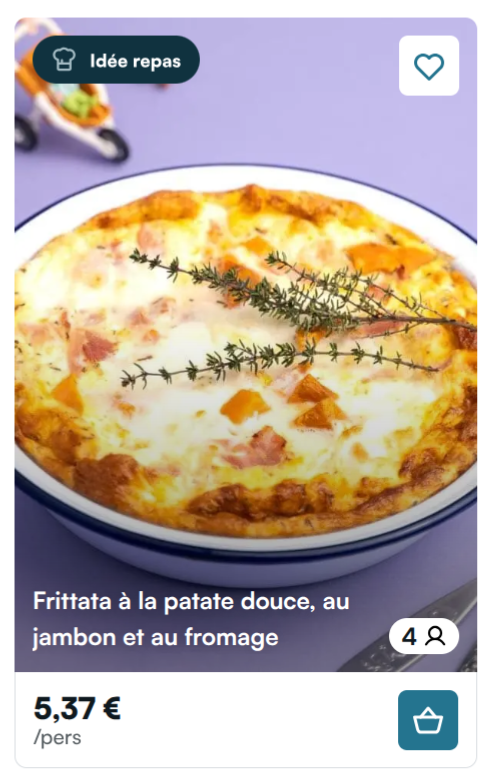
The recipe card is the base of Mealz' whole experience. This card fetches and shows a recipe based on the items that are displayed around it (see here to see how the process of fetching the best recipe works).
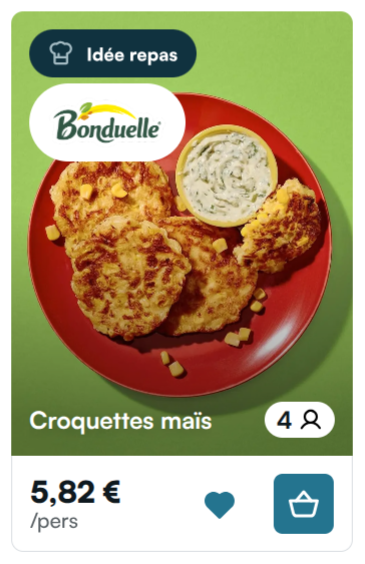
The primary CTA on the card is the "Basket icon" button. When clicked, Mealz's drawer opens and shows the recipe's details. Clicking on the picture or title has the same effect.
Finally, by clicking on the heart icon the user can add the recipe to Mealz's favorite recipes list. This icon only appears if the user is connected.
The base url for the recipe-card is the following:
GET https://MEALZ_SSR_API_URL/API_VERSION/recipe-card
-
Parameters :
-
surrounding_products_ids: string[]: (Mandatory if norecipe_idprovided) an array of productIds around the place where you want to put the recipe card, the goal is to find a recipe matching the products eg: if the recipe is surrounded by milk, we want to show a recipe that needs milk -
recipe_id: string: (Mandatory if nosurrounding_products_idsprovided) load a recipe from its id -
store_id: string: (Recommended) We need your store ID to display the price of the recipe, so ideally it should be passed if the user has chosen a store -
variant: number = 1: (Optional) Select the variant for the display of the card. Default is 1, available values are 1, 2 and 3 (see below for examples). -
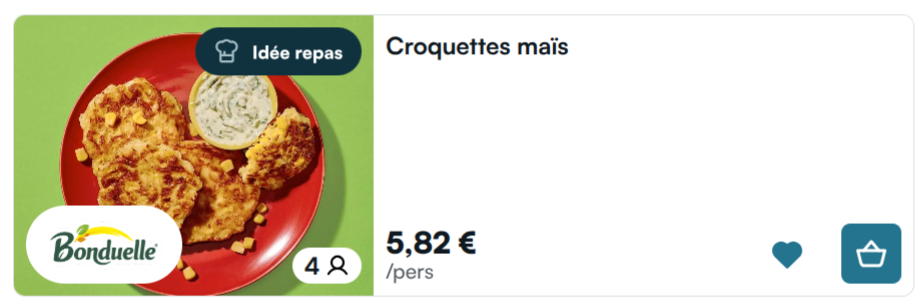
orientation: 'vertical' | 'horizontal' = 'vertical': (Optional) Select the orientation for the display of the card (see below for examples) -
current_products_ids: string[]: (Optional) takes an array of product ids with a high priority on the suggestion. Does not have any effect if not paired with surrounding_products_ids -
serves: number(Optional) Override the default number of guests set for the recipe -
allow_default: boolean = true🆕: (Optional) Whentrue(default), if no recipe suggestion is found for the given context, a generic "Discover our catalog" redirect card is rendered instead of returning nothing. Set tofalseto suppress this fallback behavior.
-
Displaying a fixed recipe can be tempting if you want to have control on the content appearing on your website, but it also means that the users will always see the same recipes at the same places and may not stay interested, while our algorithm has some random elements to it that makes the content vary between sessions, giving the user more inspiration.
Example :
Do not forget the mandatory HTTP headers
A recipe contextualized with surrounding products (Recommended):
GET https://MEALZ_SSR_API_URL/API_VERSION/recipe-card?surrounding_products_ids=["123456","234567"]&store_id=1234&serves=4&variant=3&orientation=horizontal
A fixed recipe:
GET https://MEALZ_SSR_API_URL/API_VERSION/recipe-card?recipe_id=12345&store_id=1234&serves=4&variant=3&orientation=horizontal
Display variants
Variants were renumbered in V3: the old variant 2 was removed, old variant 3 is now variant 2, and old variant 4 is now variant 3.
Recipe cards that are drinks now display a drink badge automatically.
When no recipe suggestion is available for a shelf position, a generic "Discover our catalog" redirect card is rendered by default. See the allow_default parameter to opt out.
Variant 1 (default):
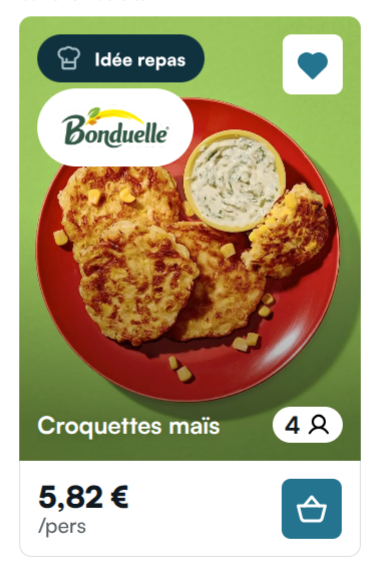
Variant 2 — like button in the footer instead of the top-right corner:
Variant 3 — intended for the history drawer:
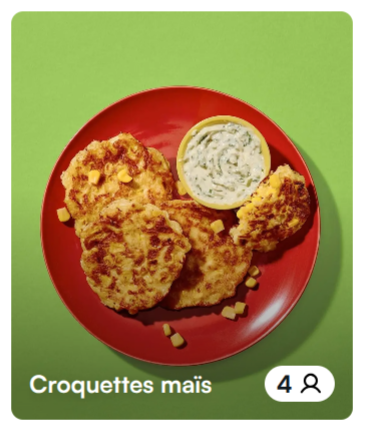
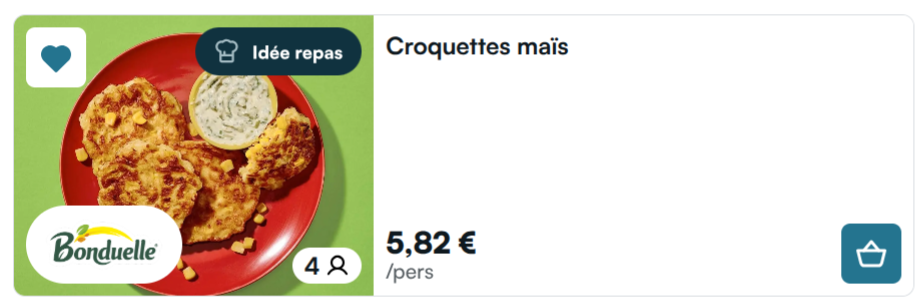
In horizontal layouts, the bottom section of the vertical card moves to the right; variant 3 has no bottom section, thus variant 3 does not have a horizontal layout.
I18n
The customizable text contents for this component are the following:
{
  "RECIPE_PRICING": {
    "PER_GUESTS": "/pers."
  },
  "RECIPE_CARD_CTA": {
    "IN_BASKET_ICON_ALT": "See the products currently in basket",
    "NOT_IN_BASKET_ICON_ALT": "See the products"
  },
  "RECIPE_PROMOTION_BADGE": {
    "TEXT": "On sale"
  },
  "RECIPE_CARD_GENERIC": {
    "TITLE": "Need inspiration?",
    "CTA": "Discover our recipes"
  }
}
See Internationalisation for more information on how to configure a custom I18n file to override our base texts with your own.
Fetching multiple recipe cards at once
For performance purposes, we have created another route for the recipe-cards that you can call to fetch multiple cards at once. Whereas the single card route has multiple "modes" (with a recipeId or with the surrounding products Ids), this route is only intended to be used with surrounding products ids.
The base url for the multiple recipe cards route is the following:
POST https://MEALZ_SSR_API_URL/API_VERSION/recipe-card/multiple
- Parameters :
-
contexts: object[]: (Mandatory) An array of contexts, each containing productIds and position that will be used to fetch recipe suggestionproductIds: string[]: Array of 2 products IDs around the place where you want to put the recipe cardposition: number: A unique identifier that helps match each recipe card with its corresponding position in your display
-
store_id: string: (Recommended) We need your store ID to display the price of the recipe, so ideally it should be passed if the user has chosen a store -
variant: number = 1: (Optional) Select the variant for the display of the card. Default is 1, available values are 1, 2 and 3 (see the single card route above for variant examples). -
orientation: 'vertical' | 'horizontal' = 'vertical': (Optional) Select the orientation for the display of the card (see above for examples) -
serves: number(Optional) Override the default number of guests set for the recipe -
categoryId: string: (Optional) Category ID to filter recipes by category -
keyword: string: (Optional) Search keyword to filter recipes by specific terms
-
This request is a POST, because the data of the product-ids we need is a little too complex to pass via queryParams, and as such it is more practical to pass them via the body.
The expected format for the body is as follow
{
  "contexts": [
    {
      "productIds": ["productId1", "productId2"],
      "position": 0
    },
    {
      "productIds": ["productId3", "productId4"],
      "position": 1
    },
    ...
    {
      "productIds": ["productIdX", "productIdY"],
      "position": n
    }
  ],
  "categoryId": "categoryId1",
  "keyword": "optional search keyword"
}
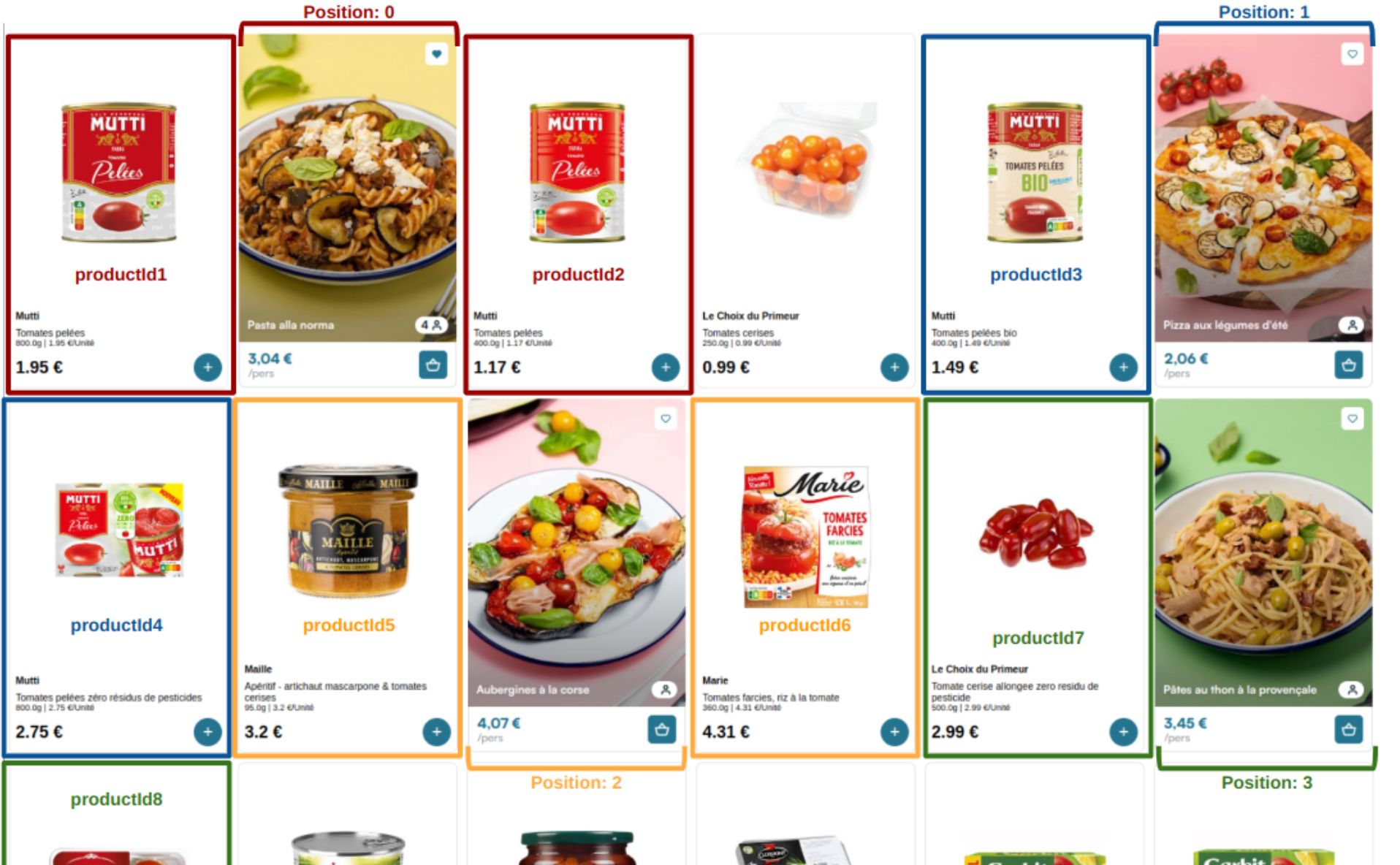
contextsis an array of "contexts", couples of productIds and positions that will each be used to fetch 1 recipeproductIds: string[]is the equivalent ofsurrounding_products_idsfor the single recipe-card route: ids of the products (in your database) between which you will insert the corresponding recipe-cardposition: number: A unique identifier that helps match each recipe card with its corresponding position in your display.
This value (position) serves two purposes:
- It helps maintain the order of cards when they're returned to you
- It allows you to map each returned HTML card to its correct location in your interface
You can use sequential numbers (0, 1, 2, 3...) or non-sequential values that correspond to positions in your product grid (e.g., 4, 8, 11 if > these are the actual positions among other products).
The value you provide will be returned unchanged with each card's HTML, allowing you to easily identify where each card should be placed in your interface.
categoryId: string(optional): Category ID to filter recipes by a specific categorykeyword: string(optional): Search keyword to filter recipes by specific terms
Because the body is in JSON format, this route needs to be called with a 'Content-Type': 'application/json' header, in addition to the usual headers needed fo all API requests
For example, instead of calling:
GET https://MEALZ_SSR_API_URL/API_VERSION/recipe-card?surrounding_products_ids=["id1","id2"]
GET https://MEALZ_SSR_API_URL/API_VERSION/recipe-card?surrounding_products_ids=["id3","id4"]
You can call:
POST https://MEALZ_SSR_API_URL/API_VERSION/recipe-card/multiple
body: "{
  "contexts": [
    {
      "productIds": ["productId1", "productId2"],
      "position": 0
    },
    {
      "productIds": ["productId3", "productId4"],
      "position": 1
    },
  ]
}"
Unlike all other routes, this route returns a JSON object and not a HTML string. The response format is as follow:
{
  "data": [
    {
      "html": "<...>",
      "position": 0
    },
    {
      "html": "<...>",
      "position": 1
    },
    ...
    {
      "html": "<...>",
      "position": n
    }
  ]
}
In the data array, each element will have an attribute html, containing the same HTML as would be contained in the single recipe-card route, and an attribute position, with the same value as the position attribute linked to the product ids that were used to generate the card, so you can easily know where to insert each card in your page.
The cards will be returned sorted by ascending position, and not necessarily in the order the product-ids were passed.
Here is an example of request:
curl --location 'https://ssr-api-uat.mealz.ai/v3/recipe-card/multiple?store_id=#STORE_ID' \
--header 'authorization: user_id #USER_ID' \
--header 'language-id: fr' \
--header 'supplier-token: #SUPPLIER_TOKEN' \
--header 'session-id: #SESSION_ID' \
--header 'Content-Type: application/json' \
--data '{
    "contexts": [
        {
            "position": 0,
            "productIds": ["#PRODUCT_ID_1", "#PRODUCT_ID_2"]
        },
        {
            "position": 1,
            "productIds": ["#PRODUCT_ID_3", "#PRODUCT_ID_4"]
        },
        {
            "position": 2,
            "productIds": ["#PRODUCT_ID_5", "#PRODUCT_ID_6"]
        },
        {
            "position": 3,
            "productIds": ["#PRODUCT_ID_7", "#PRODUCT_ID_8"]
        }
    ],
    "categoryId": "categoryId1",
    "keyword": "optional search keyword"
}'

// RESPONSE

{
  "data": [
    {
      "html": "<...>",
      "position": 0
    },
    {
      "html": "<...>",
      "position": 1
    },
    {
      "html": "<...>",
      "position": 2
    },
    {
      "html": "<...>",
      "position": 3
    }
  ]
}
And an example of result: