window.mealz
The window.mealz object still has a lot more methods and attributes that can make a big difference for customizing your experience. Some of them will not be useful to you right off the bat, but can be at some point.
Except for the methods mentioned in Set up and usage, none of the methods listed in this section are necessary if the basic implementation is good enough for you. But if you want or need more customization, you may need to call some of those methods.
window.mealz.analytics
eventSent$: Observable<string>Each time Mealz sends an analytics event, it emits its content as a stringified JSON of the following format:
{
name: 'eventName',
path: 'https://www.yourdomain.com/thepath',
props: {aString: 'foo bar', aNumber: 5}
}
-
init: (domain: string) => voidInitialises the analyticswarningDeprecated, prefer using
supplier.setupWithTokenas it initialises the analytics -
setAbTestKey: (key: string) => voidInform the library of any ABTest version being showed withkeyand identifier for the version
window.mealz.basket
-
basketIsReady$: Observable<boolean>: Emits true when Mealz's basket has successfully loaded for the first time. Does not emit anything before or after that. -
initialize: () => void: Fetch the first Basket early (before any action requires it on Mealz's side), so you can start the basket-sync earlier -
reset: () => void: Resets Mealz' basket : empties all products & recipes added by the user.infoWe recommend that you use
basket.reset()when the user empties their cart on your website, to avoid the recipes being kept in a "in-basket" state but with no products and displayed at a price of 0.Outside of this usage we don't recommand using
basket.reset()except to quickly empty Mealz's basket for testing purposes -
recipeCount: () => Observable<number>: A BehaviorSubject that emits the current number of recipes in Mealz' Basket once (it waits for the Basket to be initialized to emit). -
openPreview: () => void: Opens the recipe-modal in basket preview mode to display the recipes currently in the basket (Same action as when clicking on the FAB in the recipe-catalog) -
overrideTransferUrl: (url: string): Use in the devtools on an affiliated website to override the redirection url when transferring the cart to your website. Ex: Calling overrideTransferUrl('http://localhost:3000/recipes') will make the redirection url become 'http://localhost:3000/recipes?{PARAMS}'warningOnly for debug purposes
window.mealz.basketSync
definePushProductsToCart: (pushProductsToCart: (products: ComparableProduct[]) => void) => void: The callback parameter is called when Mealz's basket changes to update the user's cart accordinglynotepushProductsToCart: a method that updates the user's cart with the products passed in parameter, by adding products if their quantity is positive, and removing them if their quantity is negativedefineAddProductsToCart: (addProductsToCart: (products: ComparableProduct[]) => void) => void: The callback parameter is called when Mealz's basket adds new products to update the user's cart accordinglynoteaddProductsToCart: a method that adds the products passed in parameter to the user's cartdefineRemoveProductsFromCart: (removeProductsFromCart: (products: ComparableProduct[]) => void) => void: The callback parameter is called when Mealz's basket removes some products to update the user's cart accordinglynoteremoveProductsFromCart: a method that removes the products passed in parameter from the user's cart (the quantity attribute of each product is a negative number to indicate that it is the quantity to remove)retailerBasketChanged: (comparableProducts: ComparableProduct[]) => void: Call to notify Mealz that the user's cart has been updatednotecomparableProducts: The products in the user's carthandlePayment: (total: number) => void: Call to notify Mealz that the user's cart was paid. Mealz then refreshes the groceries-list and basket for the next user's cartnotetotal: The total price of the cart paid
window.mealz.features
-
enableVideoRecipes: () => void: Call to enable recipes to display a video instead of their picture, if the recipe has a video -
enableArticlesInCatalog: () => void: Enable having Mealz's articles appearing in a dedicated category in the recipe-catalog component -
enableGuestsInputOnMyMeals: () => void: Call to enable guests input on My Meals view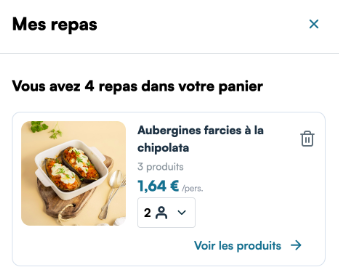
-
enableUserPreferences: () => void: Enable asking and setting user's preferences for more precision in the algorithm -
enableTagsOnRecipes: () => void: Enable displaying tags on recipe-details -
enablePersonalRecipes: () => void: Call to enable personal recipes on recipe-catalogwarningFeature is deprecated
-
enableMealsPlanner: (url: string, antiInflation?: boolean) => void: Call to enable the meals-plannernoteurl: of the page where you inject the meals plannerantiInflation: if you want to use the anti-inflation variation of the meals-plannerwarningFeature is working but will be reworked from the ground up in the future
-
collapseUnavailableProductsByDefault: () => void: Call to enable collapsing of unavailable products by default in recipe-details
window.mealz.hook
setHookCallback(callback: (isLogged, isPosValid) => boolean) => void: Set up hook callbacksetForcePosCallback: (callback: (posExtId: string) => boolean) => void: Receiving baskets from affiliated websites
window.mealz.pos
-
load: (externalId) => void: Call to inform Mealz that the point of sale has been updated. Either initialized or updated.infoDo not forget to call
pos.loadagain after each time the store changeswarningEven without a selected store, this method needs to be called with
nullorundefinedas parameter. All features of the library that need a store won't start until mealz.pos.load is called. (Otherwise it can't tell the difference between "the store has not been initialized yet" and "the user has not chosen a store)" -
getByAddress: (address: string, radius: string) => Observable<DocumentCollection<PointOfSale>>dangerThis is an internal method that will be moved elsewhere soon. Do not call
-
getByCoordinates: (longitude: number, latitude: number, radius: number) => Observable<DocumentCollection<PointOfSale>>dangerThis is an internal method that will be moved elsewhere soon. Do not call
window.mealz.recipes
-
hidden: Observable<boolean>: An observable that emits true when the recipe-modal is closed. You can subscribe on it if you want to do something just after Mealz's modal closes. -
addAllIngredientsCTAWasClicked: EventEmitter<{ ingredientsAdded: number; ingredientsTotal: number }>: An observable that emits when the "Add all ingredients" CTA on recipe-details is clicked. You can subscribe on it to display a toaster after ingredients were added for example.noteingredientsAdded: the number of ingredients added to cartingredientsTotal: the total number of ingredients in the recipewarningIt sends the number of ingredients and not of products because the SDK has no way of knowing the quantity of the potential products NOT added.
-
shouldDisplayIngredientPicturesOnRecipeCard: (should: boolean) => void: If true is passed, recipe-cards will diplay pictures of the ingredients. -
setDefaultIngredientPicture: (url: string) => void: Set a default url for if there aren't any picture for an ingredient -
setDefaultRecipePicture: (url: string) => void: Set a default url for if there aren't any picture for a recipe -
setDifficultyLevels: (levels: { value: number, label: string }[]) => void: Override default labels for difficulty levelsnotelevels: The list of labels to override for each difficulty (difficulties are respectively 1: Easy, 2: Medium, 3: Hard).For example :
[{value: 1, label: "Beginner"}]will update the label of easy recipes to "Beginner" -
showConfirmationToaster: () => void: If called, adding any product to the cart from any of Mealz's features will display a confirmation toaster
window.mealz.router
setRecipeCatalogUrl: (url: string) => void: Inform Mealz of the url where the catalog is for the redirection link of recipe-detailssetRecipeInfoLink: (url: string) => void: Inform Mealz of the url where the onboarding section of the catalog should redirectsetRetailerCartUrl: (url: string) => void: Inform Mealz of the url of your cart page if Mealz needs to redirect theresetPromotionsUrl: (url: string) => void: Inform Mealz of the url where the promotions are
window.mealz.supplier
setupWithToken: (token: string) => void: Inform the library of who you aresetOrigin: (origin: string) => void: set the origin to put in Mealz's requests headerswarningDeprecated, prefer using
supplier.setupWithTokenas it automatically sets the originload: (supplierId: number | string) => void: Identify the client websitewarningDeprecated, prefer using
supplier.setupWithTokenas it automatically loads the suppliergetAffiliateSuppliers: () => Observable<Supplier[]>dangerThis is an internal method that will be moved elsewhere soon. Do not call
window.mealz.user
-
loadWithExtId: (id, forbidProfiling = false) => void: Log in user -
reset: () => void: Log out user -
setLanguage: (lang: string) => void: Used for configuration purposes, you are now required to call this function with the desired language in ISO 639-1 format or your custom language code if using Mealz-API-SSR -
setFavoriteItems: (favoriteProductIds: string[]) => Observable<object>: If your website has a "favorite products" feature, you can pass the ids of all products which the user has marked as favorites, so they can be prioritized when adding a recipe to their cart, if one of them is returned as a matching product for the recipe.notefavoriteProductIds: an array of product ids, passed as string -
setLocation: (position: GeolocationPosition) => void: You can provide the user location if they allowed it in order to send it to our store-locatorinfothe
GeolocationPositionis the type returned by the methodnavigator.geolocation.getCurrentPosition()MDN documentationIf you use another method to get the geolocation, you can simply provide an object with the following format:
  window.mealz.user.setLocation({
    coords: {
      longitude: 50.0;
      latitude: 50.0;
    }
}) -
updateForbidProfiling: (forbidProfiling: boolean, userId: string, isAuthless = false) => void: Update the value offorbidProfilingfor the current user and load back user with user id or authless id
window.mealz.events
storeLocatorOpened: () => Observable<boolean>Emits eithertruewhen the store locator is opened orfalsewhen it's closed
Other
-
paymentStarted: (totalPrice: number) => void: It is possible that we ask you to use this method if you have trouble sending us the cart paid event. This method is meant to be called when the user begins the payment procedure (typically when they click on a "Confirm my cart" button). -
setStickyHeaderHeight: (height: number) => void: Heavily recommended Call setStickyHeaderHeight method to update your sticky header height in px. You need to call the method everytime it changes with its new height. Default value is 0 (0px for no header).warningThis setter is mandatory for our catalog-header to get fixed at the right position when scrolling. Without it, our header might get fixed above or behind your header
-
setDefaultScrollElementGetter: (callback: () => HTMLElement) => void: Heavily recommended Pass a callback that returns the default scroll container of the page so mealz modal can block the scroll when opened.infoDefault callback returns document.body. Call setDefaultScrollElementGetter(() => null) if you don't want the modal to block scroll on background.