Basket synchronization
This section is complex, but quite critical: this is where we make sure the items are correctly added to / removed from the user's cart when products were added or removed from Mealz features.
In this section and everywhere in this tutorial, we refer to Mealz' cart as "the basket" and to your cart as "your cart", to avoid any confusion between the two.
How it works
First the synchronization of baskets (basket-sync) needs two baskets to synchronize. So the process will not start until you send the first user's cart's contents to the library and mealz's first basket is initialized
Mealz' basket can be non-empty when the user opens your website, because Mealz keeps the user's current basketId in memory (in the localStorage and in the User table of our database). This is useful if your application isn't an SPA, or if the user leaves the page to come back later.
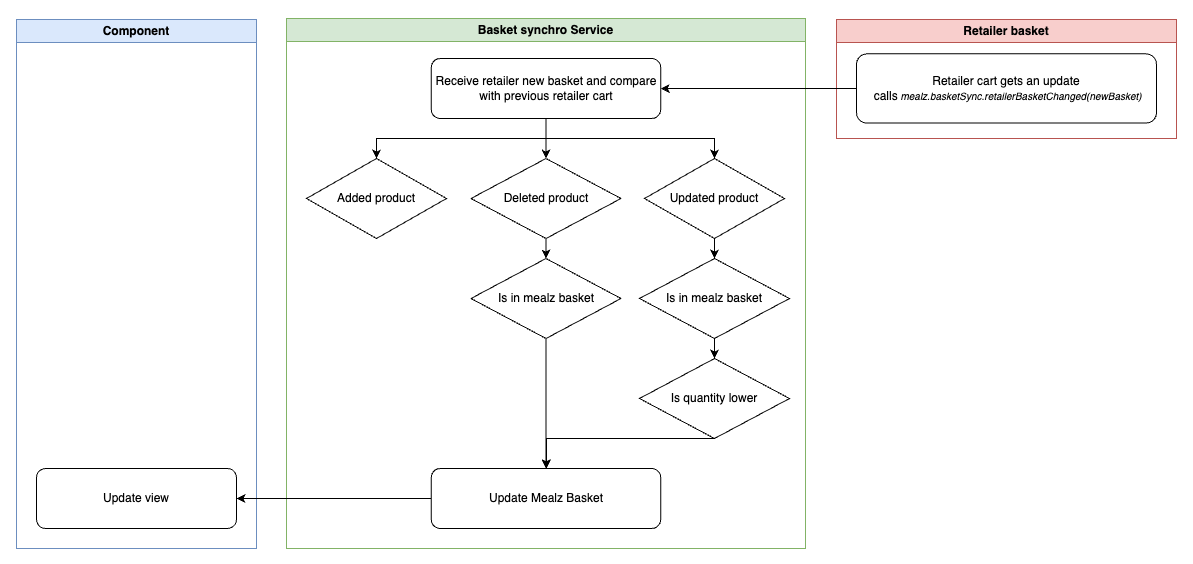
When both basket and cart are received, Mealz checks if any products are in lesser quantities in the user's cart than in Mealz' basket. If there are, meaning that the user have done modifications to their cart before the synchronization started, those products are removed from Mealz' basket until quantities are the same in the basket and the cart.
Whenever the retailer sends an updated user's cart to Mealz, Mealz checks if the user has either:
- Removed any products previously added by Mealz and removes the product from its basket.
- Lowered the quantity of any products previously added by Mealz and updates the quantity of the product in the basket.
When the user adds, changes the quantity of, or removes products from Mealz's components, Mealz sends the retailer a list of products to add, update, or remove.
We only update our basket once you send us your new cart.
If the action is not completed after 5 seconds (updated on your cart and in our basket), we roll back our components to the state before the action.
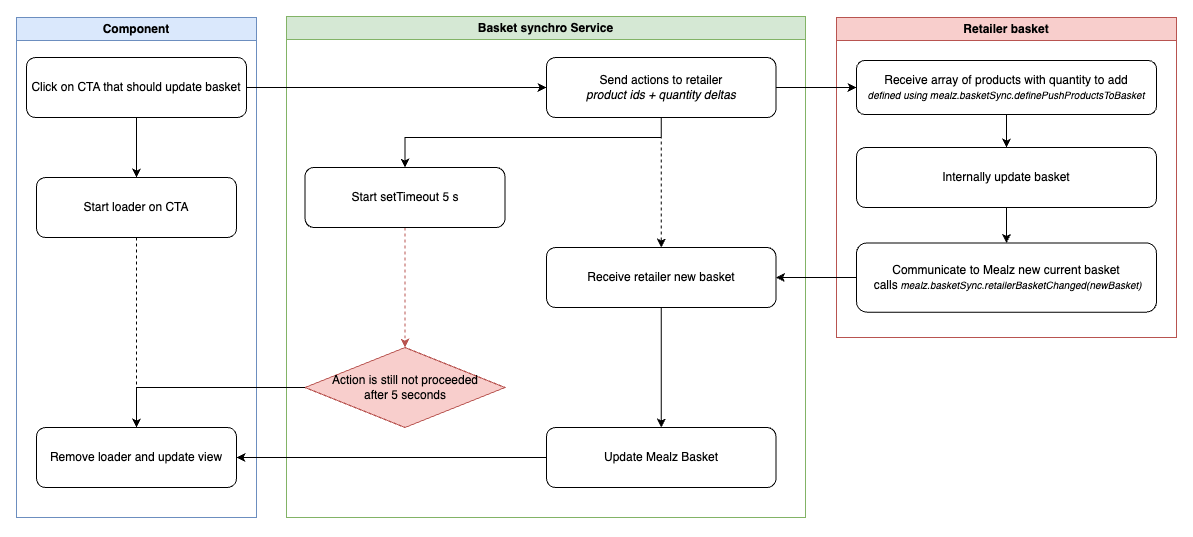
The diagram above illustrates the default basket-sync process. However, some use cases differ from it:
- Actions from basket transfer, authless basket transfer, and the planner require us to update our basket first. Then, we send the action list to your cart and, based on the cart you return, adjust our basket accordingly.
Lastly, if the user pays their cart, Mealz needs to be updated, because:
- Just as the user's cart will be reset, Mealz needs to reset the basket to start afresh for the next user's cart
- For analytics purposes, Mealz needs to know that the cart has been paid, and the total price paid for the cart, so that we can present you with stats of how many products of this cart were added from Mealz's features
To recap:
- Mealz needs to know the content of the user's cart every time it changes
- If we receive an update from you indicating that Mealz's basket contains more of a product than the user's cart, we will always adjust our basket accordingly.
- Products will be added / removed from the user's cart by Mealz only on actions performed in our components
- If the cart is correctly sent to us each time it changes, as mentioned earlier, Mealz will only request additions or removals that match the user's inputs.
How to setup the basket-sync ?
Based on the previous explanation, there are 3 points of communication between the retailer & Mealz in the basket-sync process, and all methods needed for this communication are in window.mealz.basketSync.
Mealz uses a simplified type to describe products for those methods :
ComparableProducts { id: string, quantity: number }You can also find the interface for this type just like miam-interface.ts, the file name is comparable-product.ts
retailerBasketChanged(products: ComparableProducts[]): void- Sends the updated cart to Mealz.
This method needs to be called each time the user's basket is updated (⚠️ even if the changes have nothing to do with products added by Mealz !)
// Example Setup
export class Mealz {
  // Call this method at the point of your app where the user's cart is updated
  sendCartToMealz(cart) {
    window.mealz.basketSync.retailerBasketChanged(
      // Your products aren't probably on the format {id, quantity}
      // so you need to map them to our ComparableProducts type
      cart.products.map((product) => {
        return { id: product.id, quantity: product.quantity };
      })
    );
  }
}
handlePayment(total: number): void- Notifies Mealz of a successful payment, with the total price of the paid cart.
// Example Setup
export class Mealz {
  // Call this method at the point of your app where the user's cart is paid
  sendPaymentNotificationToMealz(cart) {
    window.mealz.basketSync.handlePayment(cart.price);
  }
}
⚠️ This method needs to be called before you send to the library the cart reset on your side or else, Mealz will empty the basket before sending the event to our analytics, which means we will not be able to inform you of Mealz' impact on your sales
definePushProductsToCart(pushProductsToCart: (products: ComparableProduct[]) => void): void- Defines a callback that we can call to push products to your basket. This callback will be called everytime the user makes an action on our components that should update its cart.- The callback is called with a param
products, which is an Array of ComparableProducts which have a positive quantity if the product needs to be added to the cart and negative if it needs to be removed from the cart. (Any product replacement will result in the suppression of the previous product and then adding the new one).
- The callback is called with a param
// Example Setup
export class Mealz {
  constructor() {
    window.mealz.basketSync.definePushProductsToCart(
      this.pushProductsToCart
    );
  }

  pushProductsToCart(products: ComparableProducts[]) {
    products.forEach((product) => {
      if (product.quantity > 0) {
        // Add {quantity} number of products in the cart
      } else {
        // Remove {quantity * -1} number of products from the cart
      }
    });
  }
}
- (Optional but highly recommended)
window.mealz.basket.initialize()Initially, Mealz's basket will not be fetched until necessary (when a recipe will be added, or when the user wants to see the list of recipes they added for example). But that means that several requests will take place at some point of the user's experience, potentially slowing it a little, especially if their internet connexion is slow. If you want to avoid this, and also if you want to avoid the first step of the basket-sync (where Mealz checks that no products have been removed before the basket-sync started), you can callwindow.mealz.basket.initialize()just after sending the token, which will fetch the basket on startup.
// Example Setup
export class Mealz {
  constructor() {
    window.mealz.basket.initialize(); // If you want Mealz's basket to be fetched on startup instead of being fetched the first time it is needed
  }
}
- (Optional)
defineAddProductsToCartanddefineRemoveProductsFromCartAs an alternative todefinePushProductsToCart, you can also usedefineAddProductsToCartanddefineRemoveProductsFromCart. They work the same, but whereaspushProductsToCartis suppose to do the work of both adding and removing products from the cart,addProductsToCartshould only add products to the cart andremoveProductsFromCartshould only remove products from the cart.- Like for
pushProductsToCart, the parameterproductswill be an Array of ComparableProducts which have a positive quantity foraddProductsToCartand negative forremoveProductsFromCart. (Any product replacement will result both callbacks being called - one to remove the previous product and one to add the new one).
- Like for
You should use either definePushProductsToCart or defineAddProductsToCart and defineRemoveProductsFromCart.
You should not use both definePushProductsToCart and defineAddProductsToCart and defineRemoveProductsFromCart.
// Example Setup
export class Mealz {
  constructor() {
    window.mealz.basketSync.defineAddProductsToCart(
      this.addProductsToCart
    );
    window.mealz.basketSync.defineRemoveProductsFromCart(
      this.removeProductsFromCart
    );
  }

  addProductsToCart(products: ComparableProducts[]) {
    products.forEach((product) => {
      // Add {quantity} number of products in the cart
    });
  }

  removeProductsFromCart(products: ComparableProducts[]) {
    products.forEach((product) => {
      // Remove {quantity * -1} number of products from the cart
    });
  }
}
If you encounter synchronization issues, please check the debug logs in the console. Additionally, feel free to inform us of your specific use case, and we will work to find a solution for you.
What if Mealz is not active and my cart changes ?
If Mealz is not active on the page (because none of our features are currently displayed and the script tags have been removed from the DOM), You do not have to worry much about the basket-sync !
There are only a few things at this point for you to remember as to ensure no problems happen later:
Notify us of the cart contents during setup
Each time you display Mealz features and go through the setup process, send us the up-to-date cart. The basket-sync algorithm will check for any products removed since its last run and will update Mealz's basket to reflect only the current products in the user's cart.
Notify us when the user logs in
If the user logs in while Mealz is not active, you will need to call the /merge-authless-basket route to inform us of the login (see Transferring an authless basket after login).
This ensures that if the authless user had a cart, Mealz will merge this cart with their "logged in" cart. The next time Mealz features are displayed and the basket-sync runs, it will use the merged cart as a basis.
Notify us when the cart is paid
If the cart is paid while Mealz is not active (which will likely be the case), keep us informed. There is a route that you can call to do the same thing as window.mealz.basketSync.handlePayment does :
POST https://MEALZ_SSR_API_URL/API_VERSION/basket/handle-payment
-
Parameters:
store_id: string: (Mandatory) The store chosen for the paid cart.order_id: string: (Optional) The orderId for the cart that was paid. This can help us double-check that the route hasn't already been called for this order-id, which could cause problems in our stats.
-
Body: The method requires the same cart object you send with retailerBasketChanged, in addition to the total price of the cart. This is necessary for Mealz to run a final basket-sync cycle to detect any products removed from the cart since the last sync.
- The body is expected to be in JSON format (⚠️ Do not forget to set the Content-Type header to application/json)
- The body has one attribute
totalPricefor the total price of the user's cart (Mealz products & retailer products included) - The body has an other attribute
productsbeing an array using the same structure as the ComparableProducts described above.
See below for an example of body for the /handle-payment route:
{
  "totalPrice": 12.34,
  "products": [
    { "id": "id1", "quantity": 2 },
    { "id": "id2", "quantity": 1 },
    { "id": "id3", "quantity": 4 }
  ],
}
Think of this route as performing the same actions as retailerBasketChanged followed by handlePayment