Basket synchronization
This section is complex, but quite critical: this is where we make sure the items are correctly added to / removed from the user's cart when products were added or removed from Mealz fetaures.
In this section and everywhere in this tutorial, we refer to Mealz' cart as "the basket" and to your cart as "your cart", to avoid any confusion between the two.
How it works
First the synchronization of baskets (basket-sync) needs two baskets to synchronize. So the process will not start until you send the first user's cart's contents to the library and mealz's first basket is initialized
Mealz' basket can be non-empty when the user opens your website, because Mealz keeps the user's current basketId in memory (in the localStorage and in the User table of our database). This is useful if your application isn't an SPA, or if the user leaves the page to come back later.
When both basket and cart are received, Mealz checks if any products are in lesser quantities in the user's cart than in Mealz' basket. If there are, meaning that the user have done modifications to their cart before the synchronization started, those products are removed from Mealz' basket until quantities are the same in the basket and the cart.
Then, whenever the retailer sends to Mealz the user's cart because it has been modified, Mealz performs the same check to check if the user has removed products added by Mealz in the cart and removes the excess from Mealz' basket.
When the user adds products to their basket or change a products' quantity from Mealz's components, Mealz compares the newest basket to the oldest one, and sends to the retailer the list of products to add or remove.
Lastly, if the user pays their cart, Mealz needs to be updated, because:
- Just as the user's cart will be reset, Mealz needs to reset the basket to start afresh for the next user's cart
- For analytics purposes, Mealz needs to know that the cart has been paid, and the total price paid for the cart, so that we can present you with stats of how many products of this cart were added from Mealz's features
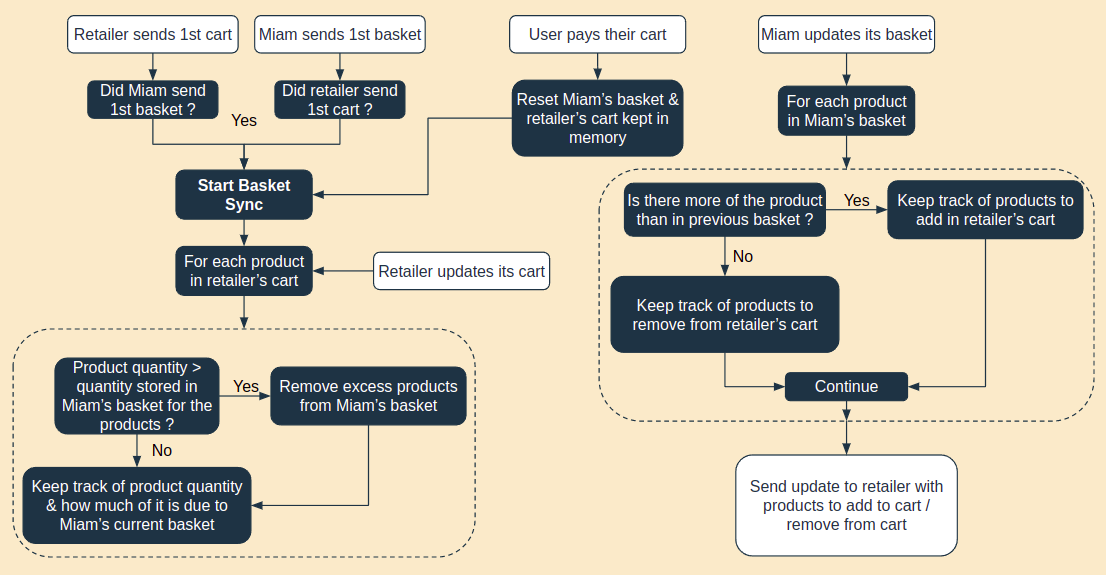
To recap:
- Mealz needs to know the content of the user's cart every time it changes
- If an update comes from you and there is more of a product in Mealz' basket than in the user's cart, the correction is always done on our basket
- Products will be added / removed from the user's cart by Mealz only on actions performed in our components
- If the cart is correctly sent to us every time it changes as mentionned earlier, only the quantities corresponding to the user's inputs will be asked to be added / removed by Mealz
How to setup the basket-sync ?
Based on the previous explaination, there are 3 points of communication between the retailer & Mealz in the basket-sync process, and all methods needed for this communication are in window.miam.basketSync.
Mealz uses a simplified type to describe products for those methods :
ComparableProducts { id: string, quantity: number }You can also find the interface for this type just like miam-interface.ts, the file name is comparable-product.ts
- Sending the user's cart to Mealz is done with
retailerBasketChanged(products: ComparableProducts[]): void
This method needs to be called each time the user's basket is updated (⚠️ even if the changes have nothing to do with products added by Mealz !)
// Example Setup
export class Mealz {
  // Call this method at the point of your app where the user's cart is updated
  sendCartToMealz(cart) {
    window.miam.basketSync.retailerBasketChanged(
      // Your products aren't probably on the format {id, quantity}
      // so you need to map them to our ComparableProducts type
      cart.products.map((product) => {
        return { id: product.id, quantity: product.quantity };
      })
    );
  }
}
handlePayment(total: number): voidis the way for you to tell Mealz that the user has paid their cart, with the total price of the paid cart.
// Example Setup
export class Mealz {
  // Call this method at the point of your app where the user's cart is paid
  sendPaymentNotificationToMealz(cart) {
    window.miam.basketSync.handlePayment(cart.price);
  }
}
⚠️ This method needs to be called before you send to the library the cart reset on your side or else, Mealz will empty the basket before sending the event to our analytics, which means we will not be able to inform you of Mealz' impact on your sales
- The last method is a little more complicated. When Mealz will want to send you the products to update in the user's cart, the library will need a way to send those products to you. The simplest way of achieving this is having a method that you can pass a callback to, so we can call this callback anytime products need to be added / removed.
To do this, you will need to call
definePushProductsToBasket(pushProductsToBasket: (products: ComparableProduct[]) => void): void;
// Example Setup
export class Mealz {
  constructor() {
    window.miam.basketSync.definePushProductsToBasket(
      this.pushProductsToBasket
    );
  }

  pushProductsToBasket(products: ComparableProducts[]) {
    products.forEach((product) => {
      if (product.quantity > 0) {
        // Add {quantity} number of products in the cart
      } else {
        // Remove {quantity * -1} number of products from the cart
      }
    });
  }
}
- (Optional but highly recommended) Initially, Mealz's basket will not be fetched until necessary (when a recipe will be added, or when the user wants to see the list of recipes they added for example). But that means that several requests will take place at some point of the user's experience, potentially slowing it a little, especially if their internet connexion is slow.
If you want to avoid this, and also if you want to avoid the first step of the basket-sync (where Mealz checks that no products have been removed before the basket-sync started), you can call
window.miam.basket.initialize()just after sending the token, which will fetch the basket on startup.
// Example Setup
export class Mealz {
  constructor() {
    window.miam.basket.initialize(); // If you want Mealz's basket to be fetched on startup instead of being fetched the first time it is needed
  }
}