Favorites Walkthrough
The Favorites feature is the standalone page where users see their liked recipes.
Time to read:

10 minutes
Time for base implementation:
2 hours
Time for full customization:
4 hours
Prerequisites
Packages
To have the Catalog functioning properly, you must install our packages mealz-core & mealz-android.
Here are the instructions
Initialize Mealz
Also, you must initialize Mealz in your MainActivity. Here are the instructions
if you are a provider or here if you are a supplier, if you don't know which configuration you need check here
Enable Like Functionality
Inside your MealzManager, you'll need to ensure that the like functionality is enabled.
By default, setEnableLike is set to TRUE.
However, if it was previously turned off, or you would like to be explicit, you can add this code:
Mealz.user.setEnableLike(isEnable: true)
Ingredients
Favorites Page
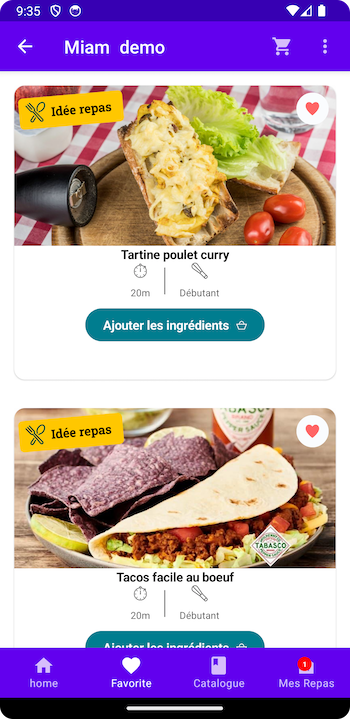
The Favorites Page shows the recipes that a particular user has liked, or hearted.
These recipes are displayed in a list, where you can determine how many columns.
This page is usually standalone, like a tab by itself or in the user's Account Settings.
Additionally, if the user lands on this page without any recipes liked, they can navigate to the Catalog Feature.
Like Button
The Like Button is togglable button that allows the user to add the recipe to their 'favorites'.
When the button is pressed, the icon will be full.
This component is displayed on the Catalog & Mealz Planner Recipe Cards, as well as Recipe Details.
Additionally, it can also be added to the Basket Recipe Cards (recipes with ingredients).

Customization
If you would like to customize your components, such as the Empty, Loader, or RecipeCard, you can read our documentation here.
Next Steps
After integrating Favorites, you have a standalone page for your users, most likely in their Account.
If you'd like to add another Miam feature to their Account, you can integrate the standalone MyMeals page.
Additionally, if you'd like to provide another useful feature for your users, you can add Meal Planner.